Overview
In this article we will discuss User Maintenance, which after a facility goes life is managed by the facility.
Description
After Go-Live, ACCUflo User Maintenance will be managed by the community. This includes adding new users, changing passwords, unlocking users, inactivating users, and editing user permissions/roles. If your corporate group has restrictions on User Maintenance, see your corporate policy for directions on how to proceed.
Note: To maintain the security of the application, ALINE Customer Support can not (by policy) create user accounts after a facility is live, or reset password for users that have not established security challenge questions.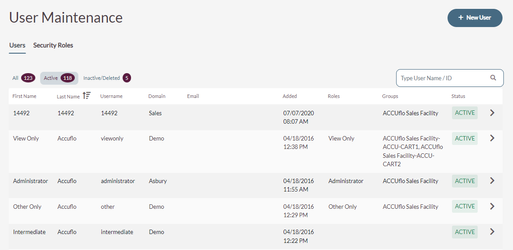
- Procedure for Adding a New User
- Procedure for Adding Agency Staff
- Procedure for Searching for Users
- Procedures for Editing Permissions
- Procedure to Edit a User
- Procedure to Change Password
- Procedure for Unlocking a User Account
- Procedure for Providing a User Access to More Than One Community
- Procedure for Removing a User’s Access to More Than One Community
- Security Roles
Was this article helpful?
That’s Great!
Thank you for your feedback
Sorry! We couldn't be helpful
Thank you for your feedback
Feedback sent
We appreciate your effort and will try to fix the article