Overview
In this article we will review the Procedure for Providing a User Access to More Than One Community.
Description
Step 1: Log into the community where the user was initially added.
Step 2: Select the Waffle Menu, then User Maintenance from the header of any screen in ACCUflo.
Step 3: Select the user that needs access to another community to display the Overview screen.
Step 4: In the Assigned Organizations section, type the name of the community that the user needs access to.
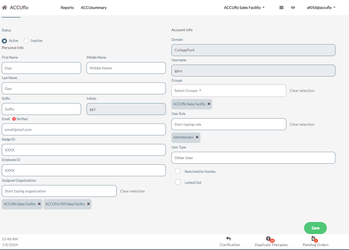
Step 5: The community will display below the text box.
Step 6: Repeat steps 5-7 for each community that needs to be added.
Step 7: Click Save when completed.
Note: You can only grant access to communities to users that you yourself have access to.
Was this article helpful?
That’s Great!
Thank you for your feedback
Sorry! We couldn't be helpful
Thank you for your feedback
Feedback sent
We appreciate your effort and will try to fix the article