Overview
In this article we will review the process of Editing Permissions for user accounts.
Description
Administrators and Advanced users can customize permissions for an individual user.
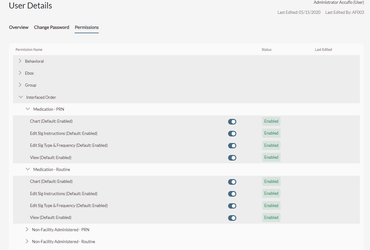
Step 1: From the Header Menu of User Detail, select Permissions.
Step 2: Select the permission category that needs to be modified.
Step 3: The Permissions and Permission Actions will display.
Step 4: Enable/Disable the Permission Actions that need to be changed. Refer to Security Roles section for additional information.
Step 5: Select Save.
Step 6: If necessary, repeat steps 2-5 until the user’s permissions have been customized as needed.
Was this article helpful?
That’s Great!
Thank you for your feedback
Sorry! We couldn't be helpful
Thank you for your feedback
Feedback sent
We appreciate your effort and will try to fix the article