Overview
In this article we will review the procedures for documenting a PRN as Did Not Administer (DNA).
Procedure for Documenting a PRN as Did Not Administer (DNA)
Users can document that a PRN was offered, but not administered. Refer to the community’s policy for using Did Not Administer on PRNs.
Example: A resident has a sliding scale PRN insulin order. You offer the resident insulin, check the blood sugar, and determine that insulin is not needed per the parameters of the sliding scale. Your community requires you to document the blood sugar and your attempt to administer the PRN.
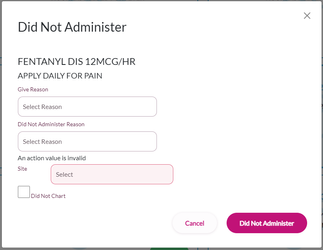
Step 1: Select the order that was not administered.
Step 2: Select Did Not Administer.
Step 3: Select the reason the order was offered from the Give Reason drop-down.
Step 4: Select the reason for not administering the order from the Did Not Administer Reason drop-down.
Step 5: Record any values that were checked, for values that were not checked select, Did Not Chart. (In the example described above, you would be prompted for blood glucose and site. You would enter the blood glucose and select Did Not Chart for site since no administration occurred.)
Step 6: Select Did Not Administer.
Note: If multiple orders were administered for the same reason, Select "Apply to All" and the DNA reason selected for the first order will apply for all other orders
If the order not administered required an Order Action, users can chart the order action if applicable or Select Did Not Chart.
Was this article helpful?
That’s Great!
Thank you for your feedback
Sorry! We couldn't be helpful
Thank you for your feedback
Feedback sent
We appreciate your effort and will try to fix the article