Overview
In this article we will review Logging into Accuflo.
Logging into Aline eMAR (ACCUflo)
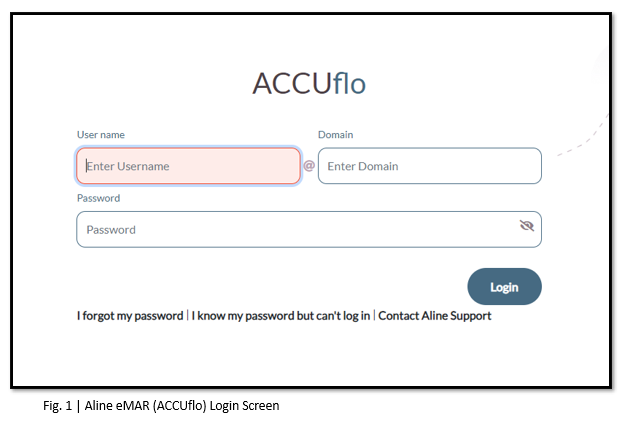
Community management will provide each user with a Username and initial Password. Each community has their own domain; which is provided prior to Go-Live. The domain (@....) may or may not be auto populated when logging in.
Step 1: If ACCUflo is not already displaying, from the computer’s desktop screen, double click the ACCUflo icon to open the webpage.
Step 2: The ACCUflo login screen will display (see Fig. 1)
Step 3: Enter your Username.
Step 4: Enter your Password.
Step 5: Select Login.
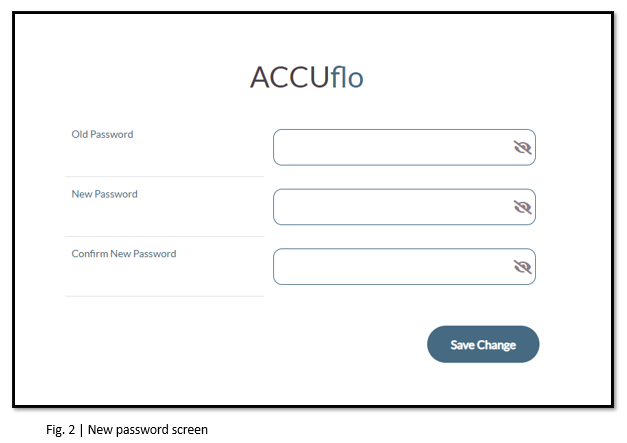
The first time a user logs in to the system, they will be prompted to enter a new password. Community management will determine the requirements for the password along with how often users will be required to create new passwords. The password is case sensitive. (see Fig. 2)
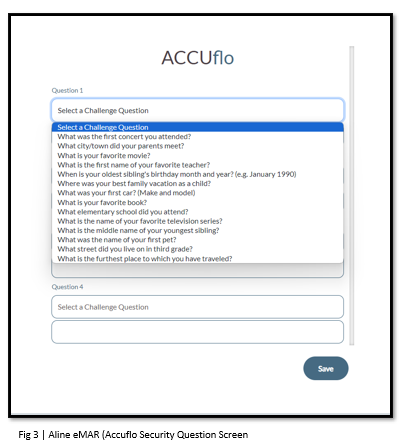
The first time a user logs into the system, they will also be required to setup four security questions as shown in Fig. 3. These security questions, when answered correctly, will allow a user to unlock their accounts, or request a password reset code from a facility administrator.
Was this article helpful?
That’s Great!
Thank you for your feedback
Sorry! We couldn't be helpful
Thank you for your feedback
Feedback sent
We appreciate your effort and will try to fix the article