Overview
In this QRG article we will review Order Approval: Direct Order Entry.
Direct Order Entry
In some situations, users may need to enter orders directly into ACCUflo. Orders entered by a community user are referred to as non-interfaced orders. Users have complete control over non-interfaced orders – including both the medication name and strength as well as the order’s instructions and give times. 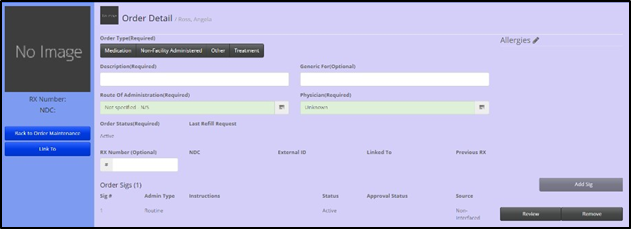
To add a non-interfaced order
Step 1: Select the desired resident.
Step 2: Select Maintenance.
Step 3: Select Order Maintenance.
Step 4: Select Add Order.
Step 5: Enter all order details.
Step 6: Select Save.
Step 7: Review and approve the order.
Most commonly entered non-interfaced orders are Other orders, like vital checks, as the pharmacy is generally only responsible for Medication and Treatment orders. Non-interfaced orders may also be necessary if a resident has medications on hand that need to be administered and the pharmacy has not yet entered the order.
Note: When entering non-interfaced Medication orders, the order description must be chosen from the dropdown listing. This list corresponds with the community's primary pharmacy's formulary.
Was this article helpful?
That’s Great!
Thank you for your feedback
Sorry! We couldn't be helpful
Thank you for your feedback
Feedback sent
We appreciate your effort and will try to fix the article