Overview
In this QRG article we will review Missed orders.
Medicine Techs: Missed Orders
If an order is not administered in the community’s compliance window, then ACCUflo will consider the order a Missed Order. It is vital to ensure there are zero missed orders at the end of your shift.
Note: Missed orders will never disappear from Aline eMAR (ACCUflo) until they are charted. Every order that was due needs to be charted, whether it was provided or not. Best practice is to ensure there are zero Missed Orders at the end of each shift to prevent the orders from snowballing into and unmanageable number of missed orders.Missed orders can be found three different ways:
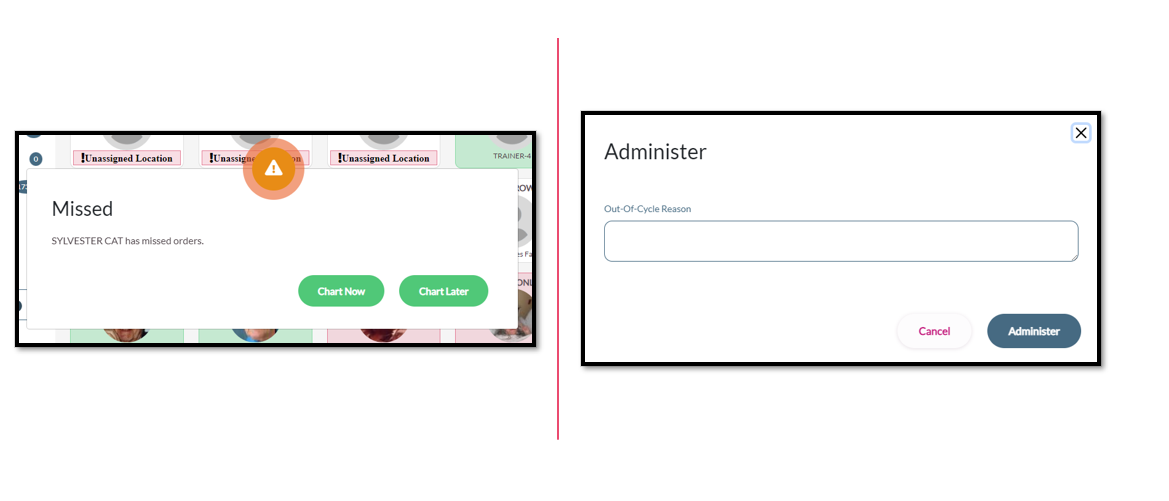
- When searching a resident with Missed Orders, Aline eMAR (ACCUflo) will prompt users to chart the Missed Orders
- Users can sort by missed orders from the Home Screen to display all residents who have Missed Orders
- Users can select the Missed Orders category from the residents profile page.
After administering Missed Orders, ACCUflo will prompt users for the Out of Cycle Reason – or, why the order wasn’t passed within the community’s compliance window.
After providing the mandatory Out of Cycle reason on the Missed Orders, select Administer again to complete the administration.
Was this article helpful?
That’s Great!
Thank you for your feedback
Sorry! We couldn't be helpful
Thank you for your feedback
Feedback sent
We appreciate your effort and will try to fix the article