Overview
In this article we will review the Vitals Report, which lists various clinical data recorded in ACCUflo for a specified Date / Time Range. The report captures data for the following order actions: AHR, B/P, BP LIE, BPSTAND, BP SIT, BS, HCT, HGB, HR LIE, HR SIT, HRSTAND, IN, INR, MIN, O2 SAT, OUT, OUTPUT, P, PERCENT, %, PT, PTINR, PULSE, RESP, SBP, TEMP, WEIGHT, and WT. The user can run the report for all values (default) or select certain value(s) by customizing the report.
Note: Default Values can be selected in Report Maintenance.
Description
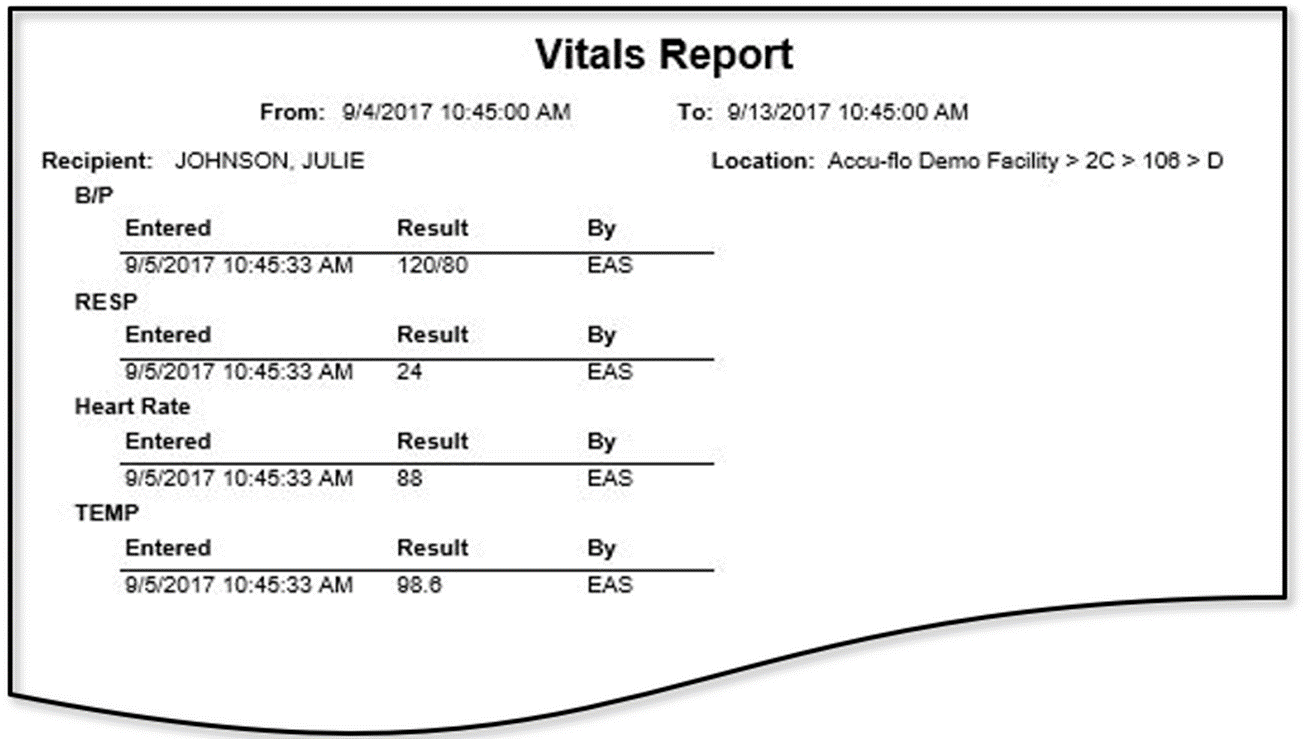
The Vitals report provides a record of the clinical data for the resident as recorded in ACCUflo for a specified time period. The report can be run for a single resident or multiple residents/groups and can include multiple vital signs. The default vital signs for the report are defined by the community in Facility Maintenance. The report will include the Recipient, their location, the Vital Sign Checked, the Recorded Vital Sign, the Date Entered, and the User.
Was this article helpful?
That’s Great!
Thank you for your feedback
Sorry! We couldn't be helpful
Thank you for your feedback
Feedback sent
We appreciate your effort and will try to fix the article