Procedure for Unlocking your Account
If you believe you have locked yourself out of your account and have previously setup your Security Challenge Questions (See: ALINE eMAR (Accuflo) User Self-Service | Procedure for setting up Security Challenge Questions) you can use the self-service user account unlock available on the ALINE eMAR (ACCUflo) login page.
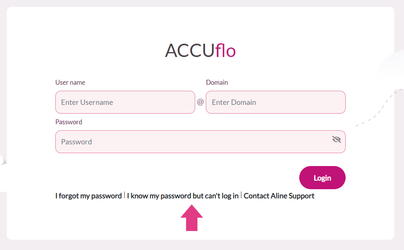
Step 1: On the login page, click I know my password but can’t login
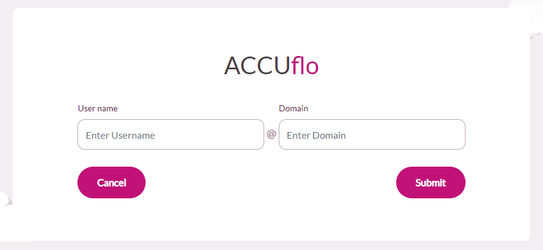
Step 2: Enter your username and domain and click Submit
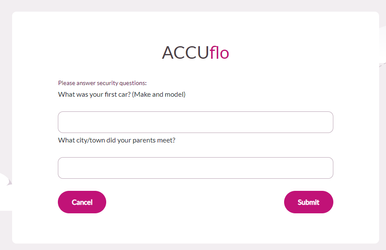
Step 3: Enter your responses to the two randomly selected challenge questions, then click Submit.
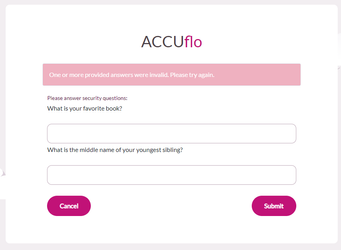
Step 4: If your answers are incorrect, you will be prompted to answer two additional randomly selected security questions. Additional incorrect answers will result in a 30 minute lockout before you will be able to attempt an unlock again.
Step 5: If you have access to more than one community, you will be prompted to select the community you are trying to access
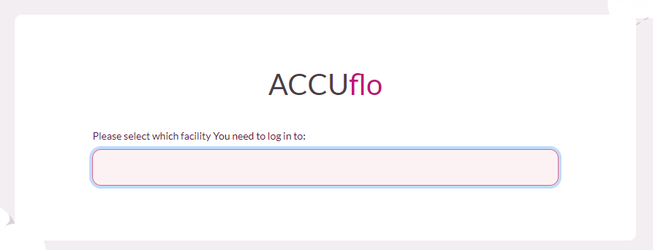
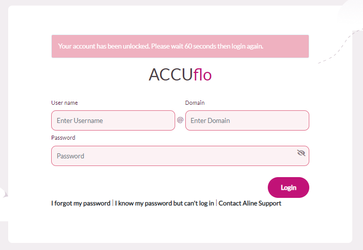
Step 6: After successfully answering two challenge questions and selecting the facility you are trying to access, you will be redirected to the login screen. Please wait 60 seconds to allow the change to sync throughout the system before trying to login again.
Was this article helpful?
That’s Great!
Thank you for your feedback
Sorry! We couldn't be helpful
Thank you for your feedback
Feedback sent
We appreciate your effort and will try to fix the article