Overview
In this article we will discuss the procedure for updating settings in Facility Maintenance.
To get to Facility Maintenance:
- Select the Waffle Menu, Facility Maintenance from the header of any screen in ACCUflo.
| Settings | Facility Settings is used to establish parameters and activate/inactivate features specific to the community. |
All Facility Maintenance options are community specific. These options are reviewed during the implementation process and changes should be made only after careful consideration. Please contact your Aline Implementation Specialist or Account Manager for assistance with these features.
Note: If changes are made, to ensure all changes take effect, please log out and log back into ACCUflo.
Procedure for Configurations
Step 1: Select the Waffle Menu, Facility Maintenance from the header of any screen in ACCUflo.
Step 2: Select Configurations.
Step 3: View and/or make changes to the configurations (see detail below).
Step 4: If changes are made, select Save Settings.
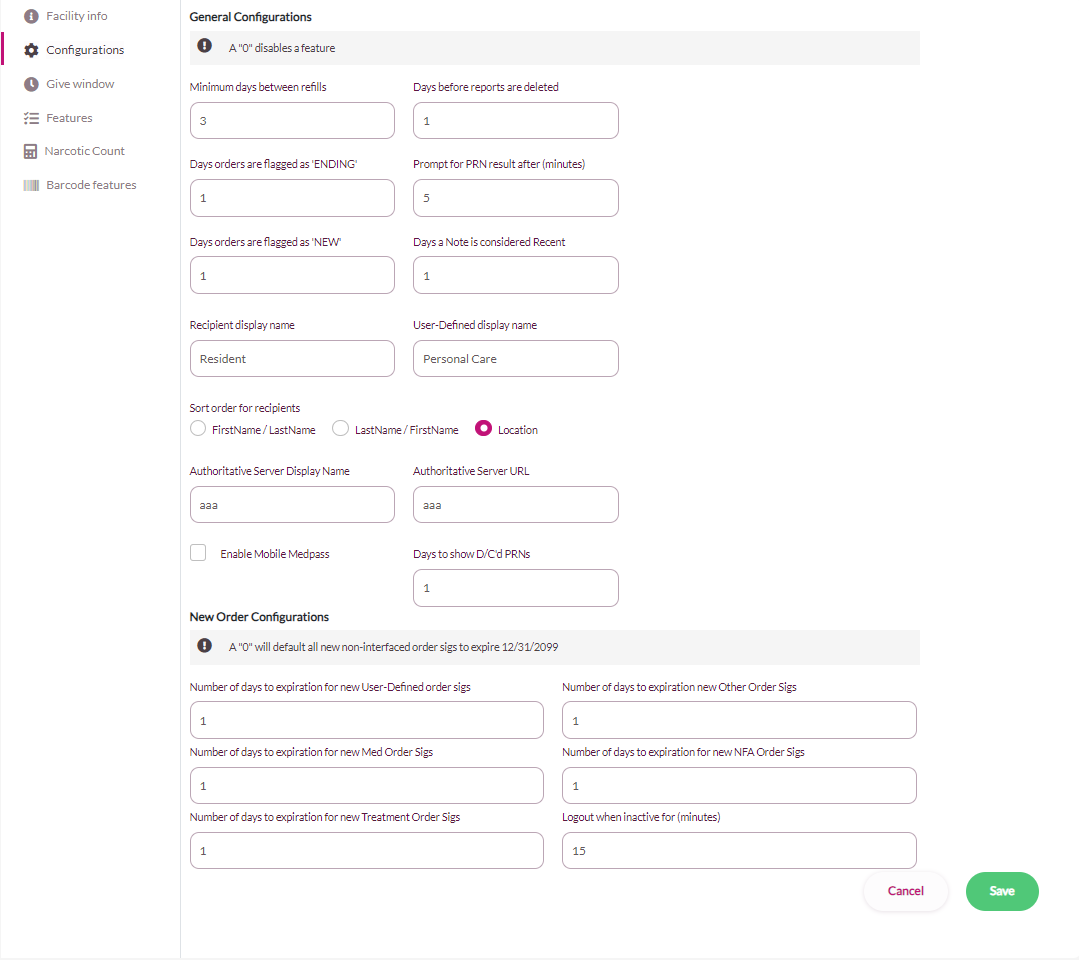
| Minimum Number of Days Between Refills | Use the up or down arrow options or enter the number of days the system will prevent a user from requesting a refill. Typically, this is set to 3. |
| Number of Days Orders are Flagged as ENDING | Use the up or down arrow options or enter the number of days the word ENDING should display on the order tile if an order has an end date within this number of days. If the community does not want ENDING to display, enter 0. |
| Number of Days Orders are Flagged as NEW | Use the up or down arrow options or enter the number of days the word NEW should display on the order tile if an order has been added or updated. If the community does not want NEW to display, enter 0. |
| Days before reports are deleted | Use the up or down arrow options or enter the number of days a report should stay in the Report Queue list before it is automatically removed from the list. |
| Prompt for PRN Result after (minutes) | Use the up or down arrow options or enter the number of minutes after a PRN administration before the result is available to be charted. |
| Note: The user should document results based on the medication and the appropriate amount time to determine the effectiveness; the user should not assume that because the result is available to chart that it is appropriate to chart at that time. | |
| Days a Note is considered Recent: | Use the up or down arrow options or enter how many days a note entered for a resident will remain labelled Recent on the resident’s screen. |
| Recipient display name | Enter the display name for recipients; for example, Resident, Patient, or Inmate. |
| User-Defined display name | Enter the name of the User-Defined order type for your community; for example, Personal Care, ADL or Nurses Orders. |
| Sort Order for Recipients | Select the radio button to choose from one of the sort options: Location, Last Name, or First name. |
| Authoritative Server Display Name | Aline use only |
| Authoritative Server URL | Aline use only |
| Days to Show Discontinued PRNs | Use the up or down arrow options or enter the number of days for discontinued PRN orders to stay on the screen. Discontinued orders are visible but inactive (cannot be administered). |
| Number of days to Expiration for User-Defined Order Sigs | When a non-interfaced order is entered, if the order type expiration by number of days is set in the system the order will end today plus the number of days, if it is set to 0 the default end date of 12/31/2099 12:00AM will be used. |
| Number of days to Expiration for new Med Order Sigs | When a non-interfaced order is entered, if the order type expiration by number of days is set in the system the order will end today plus the number of days, if it is set to 0 the default end date of 12/31/2099 12:00AM will be used. |
| Number of days to Expiration for new Treatment Order Sigs | When a non-interfaced order is entered, if the order type expiration by number of days is set in the system the order will end today plus the number of days, if it is set to 0 the default end date of 12/31/2099 12:00AM will be used. |
| Number of days to Expiration for new Other Order Sigs | When a non-interfaced order is entered, if the order type expiration by number of days is set in the system the order will end today plus the number of days, if it is set to 0 the default end date of 12/31/2099 12:00AM will be used. |
| Number of days to Expiration for new NFA Order Sigs | When a non-interfaced order is entered, if the order type expiration by number of days is set in the system the order will end today plus the number of days, if it is set to 0 the default end date of 12/31/2099 12:00AM will be used. |
| Logout when inactive for (minutes) | The setting is 20 minutes before logging a user off when there has been no activity in the application. |
Was this article helpful?
That’s Great!
Thank you for your feedback
Sorry! We couldn't be helpful
Thank you for your feedback
Feedback sent
We appreciate your effort and will try to fix the article