Procedure for Setting up Security Challenge Questions
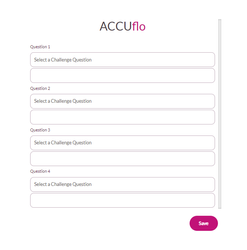
All new users will be prompted to answer four security challenge questions after logging in for the first time.
To set your challenge questions:
Step 1: Select the question you would like to answer for Question 1.
Step 2: Enter your answer in the space provided.
Step 3: Repeat steps 1 and 2 for the remaining questions.
Step 4: Click Save.
Challenge Question Requirements
- At least one character
- Only keyboard characters are allowed (no emojis or ALT key combinations)
- White space (spaces) are allowed
- Can not be left blank
- Special characters are permitted (~!@#$%^&*()_+`-={}|[]\:";'<>?,./) but must match exactly when entering the answer to unlock an account or reset a password.
- Answers can not be duplicated
Was this article helpful?
That’s Great!
Thank you for your feedback
Sorry! We couldn't be helpful
Thank you for your feedback
Feedback sent
We appreciate your effort and will try to fix the article