Aline eMAR Release Announcement – April 2026
Available: As of April 2026 for Atria Communities
We’re excited to launch the Aline eMAR 6.13 + 6.14 release for Atria communities, which introduces several all-new features – redesigned resident allergy module, bypass reason requirements for touched VS scanned administrations, location change notifications and tracking, Social Security Numbers (SSNs) included on resident profiles, Did Not Administer Alerts, and more!
To learn more about eMAR Version 6.13 + 6.14 and the newly included features, please review the information below and feel free to contact your Aline CSM with any questions or concerns.
New Features and Enhancements
Introducing the Redesigned Resident Allergy Module
This updated module brings in features from Aline Care’s allergies module (allergy categories) to Aline eMAR and adds additional features to create a best-in-class allergy management module.
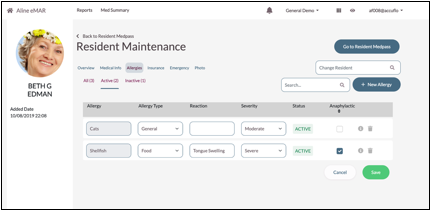
The only required field is the allergy description; however, eMAR users can add allergy types, specify reactions, the severity of the allergy, and whether the allergy produces an anaphylactic response.
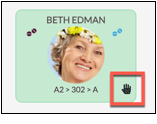
Residents with anaphylactic reactions will display Anaphylactic Indicators on both their profiles and on their tile on the main medication pass screens.
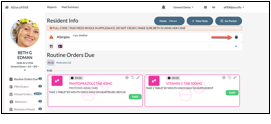
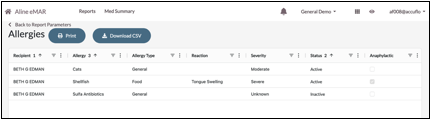
Allergy description will be included on the MAR and POS reports. The Allergy Report has been updated to Smart Grids and includes the additional information added via the allergy module, including reaction, severity, and anaphylactic reactions.
Bypass Reason Requirements for Touched VS Scanned Administrations
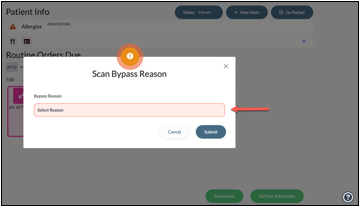
When barcode scanning is enabled and required via Facility Maintenance, Bypass Reasons will be required for all unscanned, or touched, administrations.
Bypass Reasons can be customized via Facility Maintenance > Tables > Unable to Scan Reasons.
Location Change Notifications & Tracking
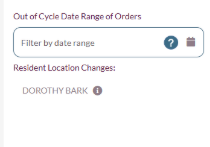
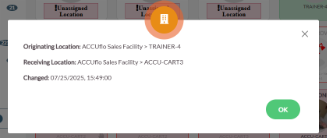
When a resident’s location is changed either by a user or by the interface, the location change will be logged as a “Location Change” note. This feature is enabled for all customers and cannot be disabled.
There are two new facility configuration options:
- Feature: Display location changes on the dashboard
- Configuration: Hours location change is considered recent '
This feature is available for all organizations, but it is not enabled by default. When enabled, a listing of recent location changes will be displayed in the left panel on the dashboard. Users can click the “I” for more location change details.
Social Security Numbers (SSNs) Included on Resident Profiles
Aline eMAR has, historically, always stored and encrypted resident SSNs when received from the interfaced pharmacy. The last four digits of the SSN is viewable on the POS. The SSN has now been added to the resident’s profile via profile maintenance.
Two new permissions have now been added:
- Recipient > SSN > View
- Recipient > SSN > Edit
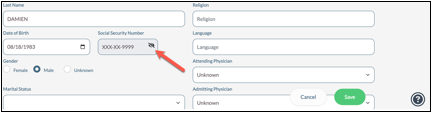
“View” is assigned to the Advanced, Administrator, and Pharmacy roles by default. This permission allows the user to unmask and view the full SSN. When the SSN is viewed, a note is automatically added to the residents notes that the SSN was viewed.
“Edit” is assigned to the Administrator and Pharmacy roles by default. If the user edits the SSN, then a change log will be generated and sent to the pharmacy.
Did Not Administer (DNA) Alerts
When the Did Not Administer Alert feature is enabled, Aline eMAR will track sequential DNAs of each order. Once the sequential number of DNAs defined in the facility configuration is reached, an Alert will be triggered for the staff to discuss the order with the resident’s provider.
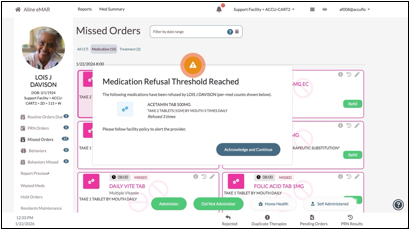
The order does not have to be specifically refused to trigger the alert, as the alert works for both routine and PRN DNA administrations. Any successful administration (not marked as DNA) will reset the counter for that order.
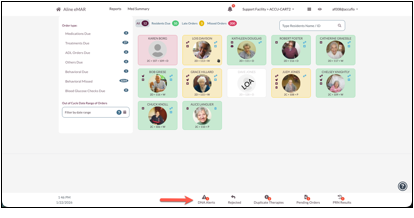
A new footer counter for DNA Alerts has been introduced that will show the number of outstanding DNA Alerts. Clicking this counter will take the user to the DNA Alert page.
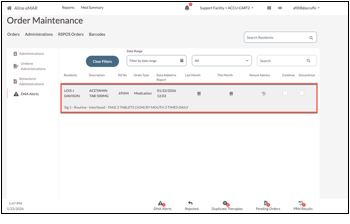
Users can view the patient, order description, RX number, order type, date the alert was triggered, last month’s MAR, this month’s MAR, and recent admins for each alert. The user can then select a disposition for the alert after discussing with the provider/physician.
Selecting Continue will clear the alert, but it will return if the next dose is DNA’d and the sequential count remains above the threshold. Discontinuing the medication will send a DC message to the pharmacy. The medication will remain active until the pharmacy approves the medication's discontinuation.
Additional Key Changes
- Reorganizes the Facility Maintenance > Features page to group-like settings together
- Redesigned the Orders Charted Report to use Aline Smart Grids for improved performance and added scan bypass reason
- Updates the bundled Microsoft SQL Server LocalDB version from 2017 to 2022
Was this article helpful?
That’s Great!
Thank you for your feedback
Sorry! We couldn't be helpful
Thank you for your feedback
Feedback sent
We appreciate your effort and will try to fix the article