Overview
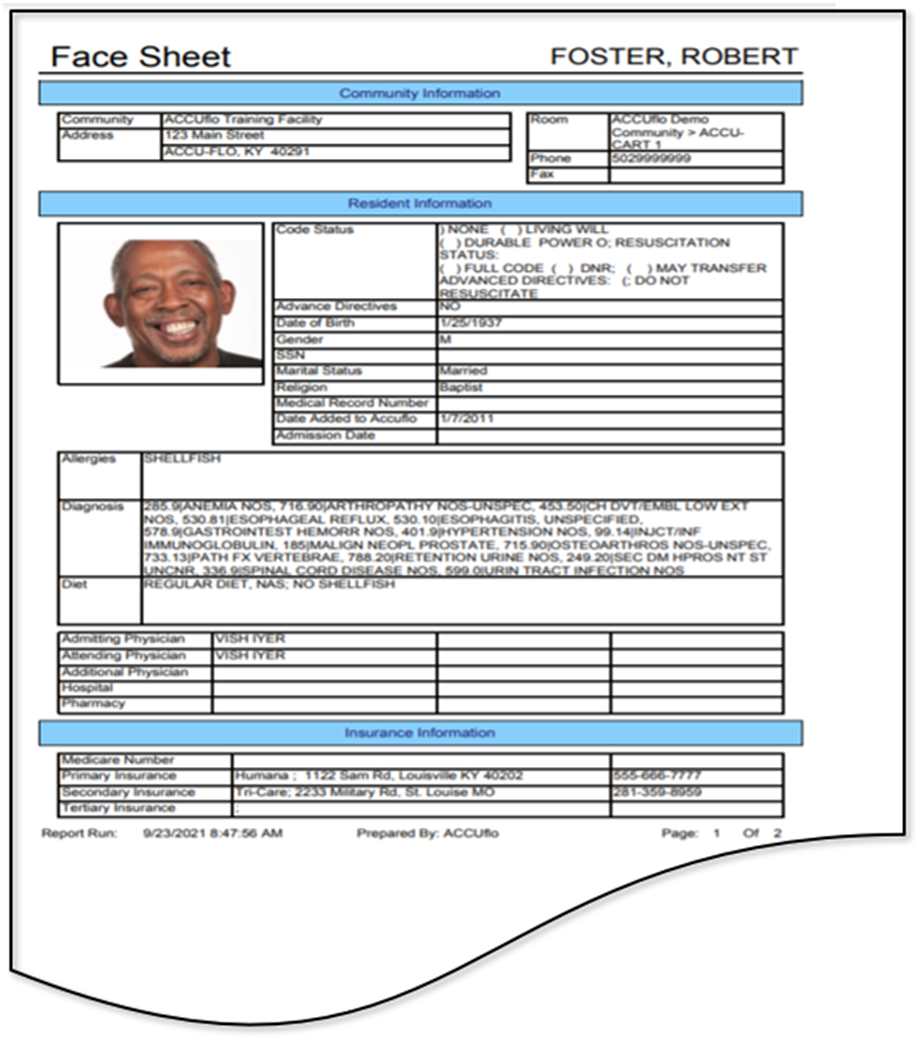
In this article we will review the Face Sheet Report, which lists community information, resident info such as allergies, diagnosis, photo, and doctors are listed as well as insurance information. Also contains an emergency contact section. Information is pulled from the Right-Hand Side of the POS, Resident Maintenance, and the remainder can be added in manually by staff.
Please Note: if your community is using the Aline Care application, you may have a setting enabled that will pull the Face Sheet from the Aline Care application in place of the Face Sheet generated by the eMAR application. The Face Sheet from the Aline Care application will differ in appearance from the Face Sheet detailed below.
Description
The Face Sheet provides an at-a-glance breakdown of a resident's information.
The report includes the community information as well as basic resident information such as the resident's photo, code status, advance directive, date of birth, last four digits of Social Security Number, marital status, religion, medical record number, date added to ACCUflo, admission date, allergies, diagnosis, physicians, and insurance information.
Additional information displaying includes race, hair color, eye color, height at admission, weight art admission, identifying marks, preferred pronouns, preferred name, sexual orientation/gender identity, AKAs, and aliases.
It can only be run for a single resident at a time.
Was this article helpful?
That’s Great!
Thank you for your feedback
Sorry! We couldn't be helpful
Thank you for your feedback
Feedback sent
We appreciate your effort and will try to fix the article