Overview
In this article we will discuss the procedures for Pharmacy Maintenance, Hospital Maintenance and Table Maintenance.
To get to Facility Maintenance select the Waffle Menu, Facility Maintenance from the header of any screen in ACCUflo.
| Tables | Allows administrative staff to edit and sort table descriptions. |
All Facility Maintenance options are community specific. These options are reviewed during the implementation process and changes should be made only after careful consideration. Please contact your Aline Implementation Specialist or Account Manager for assistance with these features.
Note: If changes are made, to ensure all changes take effect, please log out and log back into ACCUflo.
Table Maintenance
Table Maintenance is used to customize dropdown selections.
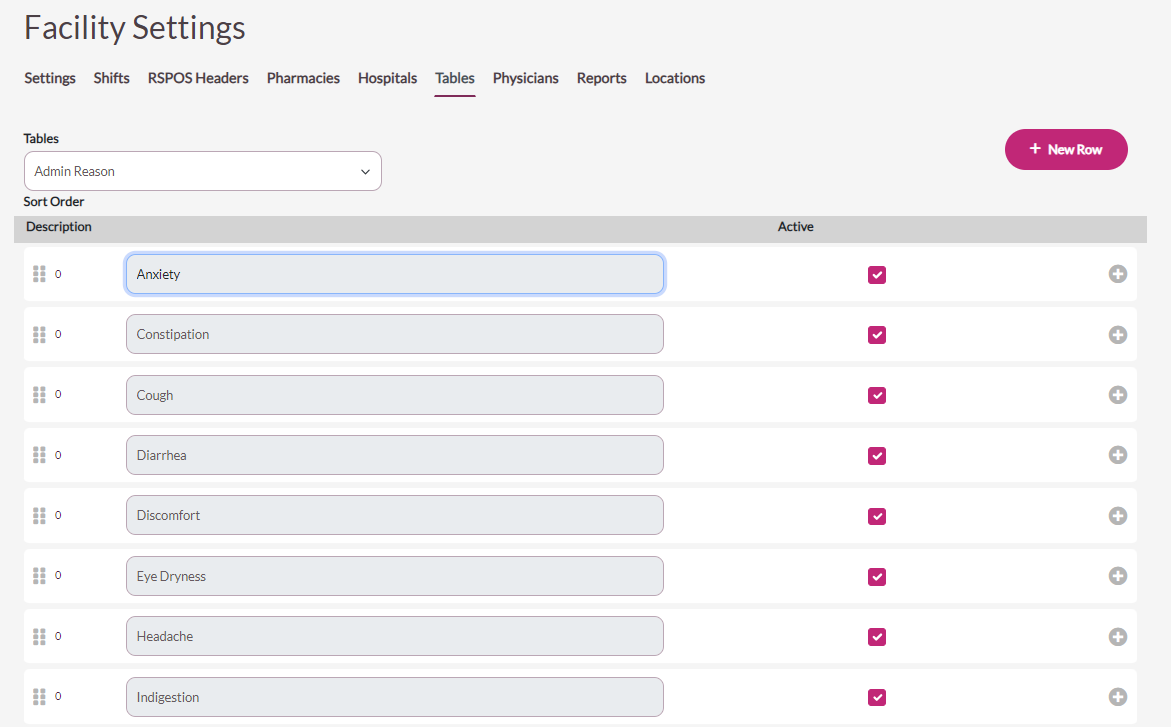
Procedure for Table Maintenance
Step 1: Select the Waffle Menu, Facility Maintenance from the header of any screen in ACCUflo.
Step 2: Select Tables from the Header Options.
Step 3: Select the Tables drop-down.
Step 4: Select the table you want to view/edit. Refer to Appendix C for default values in each table.
| · Admin Reason (PRN) · Behavior · Code Status · DNA Reason · Note Type · Note Text | · Pain Description · Pain Frequency · Pain Intensity · Pain Intervention · Reasons for Removing from Drawer · Wasted Med Reason |
The user can sort the descriptions, Add New Reason (descriptions) and/or change the Status.
- To sort the descriptions, grab the description that needs sorting and drag and drop it into a new position.
- To change the status, check the Active checkbox to make the description Active; Uncheck the Active checkbox to make the description Inactive.
- To add an option, select New Option. Enter the new description in the blank field at the bottom of the screen.
- If changes are made, select Save.
Was this article helpful?
That’s Great!
Thank you for your feedback
Sorry! We couldn't be helpful
Thank you for your feedback
Feedback sent
We appreciate your effort and will try to fix the article